Custom Pre-Inked Stamps
Custom Pre-Inked Stamps
Couldn't load pickup availability
COLOP EOS PRE-INKED STAMPS
The COLOP EOS line uses flash technology to create sharp, clean impressions that look like they came from an ink-jet printer. The ink is stored right inside the stamp, so no separate pad is needed. With a range of sizes from a slim signature line to a large 2-3/4 x 3-3/4 block, there’s an EOS stamp for nearly any job.
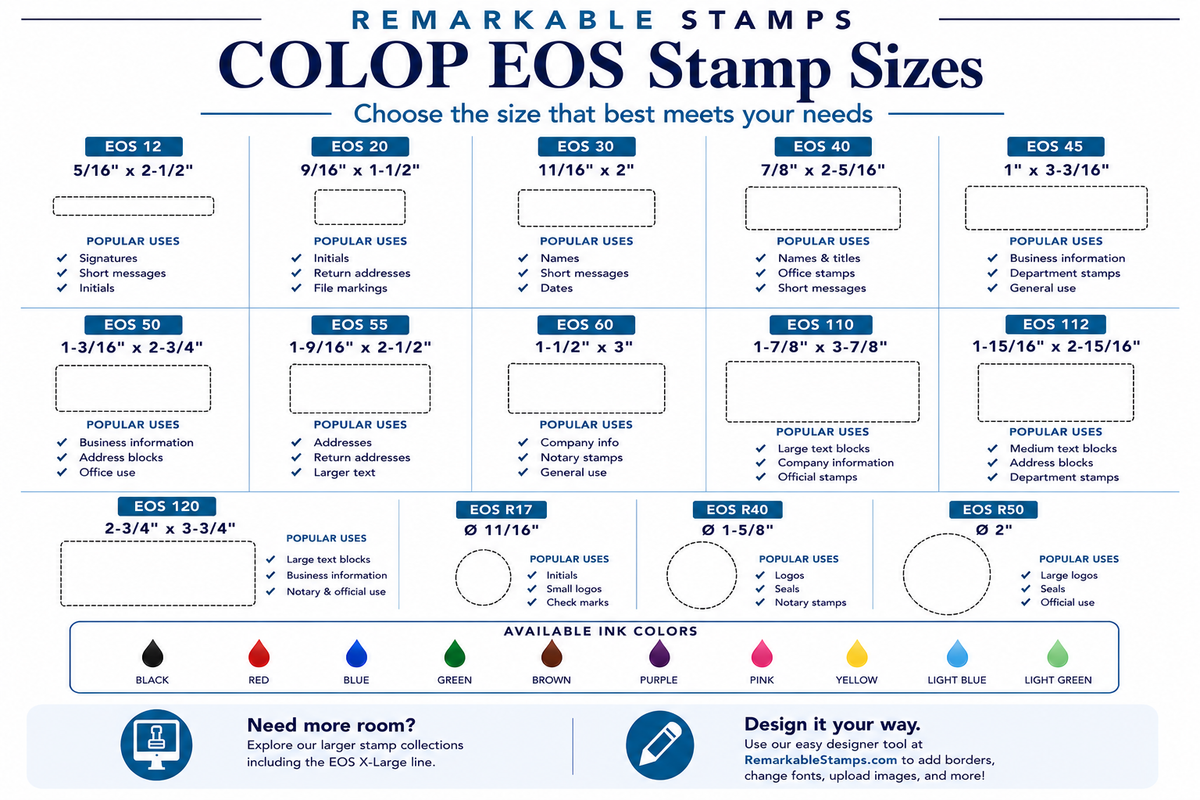
Sizes (impression size in inches, height x width)
Standard
-
EOS 12: 5/16 x 2-1/2
-
EOS 20: 9/16 x 1-1/2
-
EOS 30: 11/16 x 2
-
EOS 40: 7/8 x 2-5/16
-
EOS 45: 1 x 3-3/16
-
EOS 50: 1-3/16 x 2-3/4
-
EOS 55: 1-9/16 x 2-1/2
-
EOS 60: 1-1/2 x 3
Extra large
-
EOS 110: 1-7/8 x 3-7/8
-
EOS 112: 1-15/16 x 2-15/16
-
EOS 120: 2-3/4 x 3-¾
-
EOS 130: 3-½ x 4-1/2
Round
-
EOS R17: 11/16 round
-
EOS R40: 1-5/8 round
-
EOS R50: 2 round
Features
-
Sharp, near photo-quality impressions from flash technology
-
Ink stored inside the stamp, with no separate pad needed
-
Thousands of impressions before re-inking
-
Larger sizes than self-inking stamps, up to 2-3/4 x 3-3/4
-
Protective cover keeps the stamp clean between uses
Ink Colors
Black, red, blue, green, brown, purple, pink, yellow, light blue, and light green.
How It Works
Remove the cover and press down for a clean impression, with no ink pad needed. The ink is held in the stamp’s foam, which slowly feeds ink to the stamp face. Pre-inked stamps are ideal for everyday use. For hundreds of impressions a day, a self-inking stamp is a better fit, since the foam needs time to re-absorb ink between heavy use.
When the impression starts to fade, add a few drops of oil-based refill ink. Use only oil-based ink made for pre-inked stamps. Water-based self-inking ink won’t work and can ruin the stamp.
Standard ink works best on paper and cardboard. To stamp plastic bags or other non-porous surfaces, see our multi-surface stamps.
Design Tips for the Best Impression
-
Send black-and-white art. Color, grayscale, and shading all print as one solid ink color and may not look the way you expect.
-
Use a white or blank background. Background colors print as solid ink.
-
Avoid overlapping colors. Overlapping areas merge into one solid shape.
-
Keep text large enough to read at your stamp size. Flash stamps capture fine detail, but very small text can still blur.
-
Upload your original artwork, not a photo of it on a screen.
-
No need to reverse your art. We take care of that.
Artwork Files
Upload your artwork right in the designer. Image files such as JPG, PNG, and WebP show a preview on your stamp. PDF, AI, and EPS files upload with your order but won’t appear in the preview, and we’ll still use them to make your stamp. If you upload one of these files, please convert all text to outlines first. Please don’t upload Word documents, since they can’t be used to make your stamp. For the best results, upload the clearest art you have.