Custom Multi Surface Stamps
Custom Multi Surface Stamps
Couldn't load pickup availability
COLOP EOS MULTI-SURFACE STAMPS
COLOP EOS multi-surface stamps put a permanent mark on the surfaces regular stamps can’t handle. Their alcohol-based ink grips plastic bags, glossy paper, photos, metal, glass, and fabric, and it works on regular paper and cardboard with varying results. Flash technology gives you sharp, near photo-quality impressions with no ink pad needed.
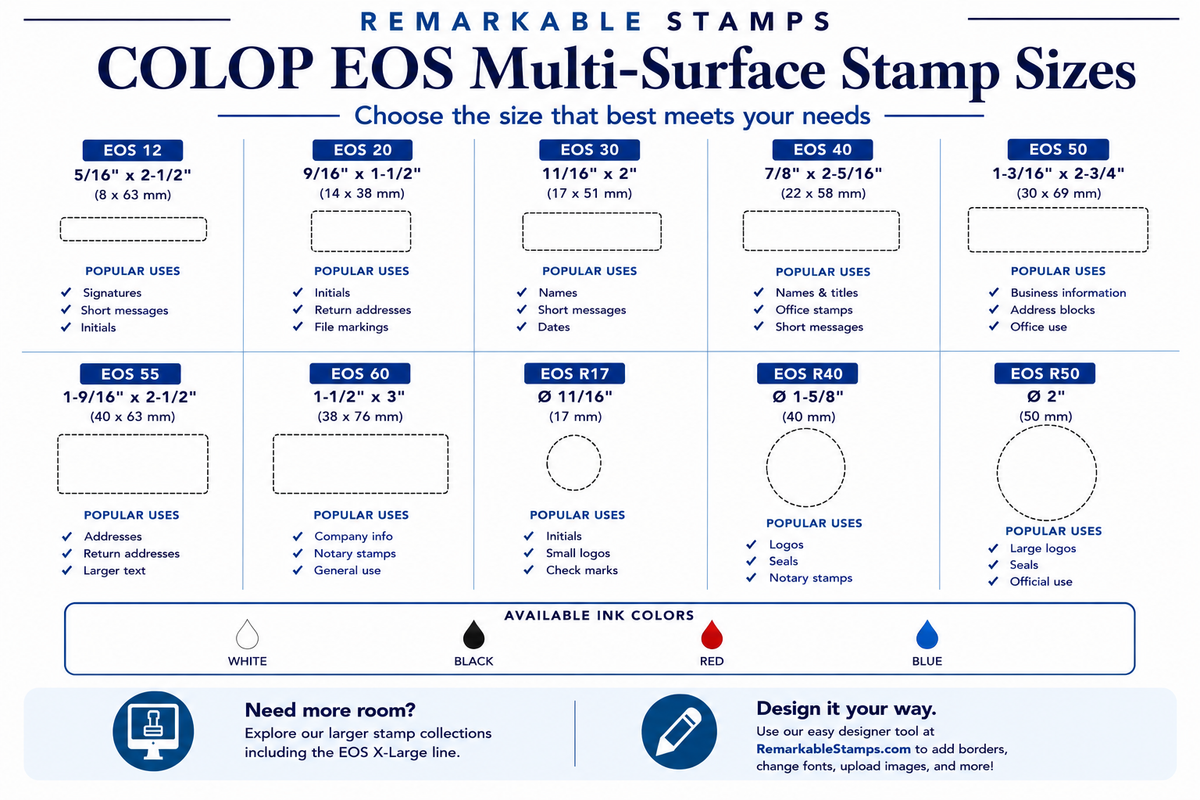
Sizes (impression size in inches, height x width)
Rectangle
-
EOS 12: 5/16 x 2-1/2
-
EOS 20: 9/16 x 1-1/2
-
EOS 30: 11/16 x 2
-
EOS 35: 1-3/16 x 2
-
EOS 40: 7/8 x 2-5/16
-
EOS 45: 1 x 3-3/16
-
EOS 50: 1-3/16 x 2-3/4
Round
-
EOS R17: 11/16 round
-
EOS R40: 1-5/8 round
-
EOS R50: 2 round
Features
-
Fast-drying, water-resistant ink for plastic, glossy, and other non-porous surfaces
-
Sharp, near photo-quality impressions from flash technology
-
Ink stored inside the stamp, with no separate pad needed
-
Thousands of impressions before re-inking
Ink Colors
Black, blue, red and white.
How It Works
Remove the cover and press down for a clean impression. The ink dries quickly, usually in under a minute depending on the surface. Some surfaces have coatings that slow drying or affect print quality, so test on a sample piece or an out-of-sight spot before stamping your final item.
Multi-surface stamps work best for everyday use, up to about 300 impressions a day. The ink needs time to re-soak the stamp between heavy use.
When the impression starts to fade, add a few drops of multi-surface refill ink. Use only multi-surface ink. Oil-based or water-based inks won’t work in this stamp.
Care and Storage
Because this ink dries fast, these stamps need a little extra care to keep working:
-
Always put the bottom cover back on after use. Without it, the ink evaporates quickly.
-
Store the stamp upright.
-
For longer storage, keep the stamp in a sealed plastic bag or airtight container. Add a few drops of ink to each refill hole before storing it, and a few more once a month, to keep it from drying out.
Design Tips for the Best Impression
-
Send black-and-white art. Color, grayscale, and shading all print as one solid ink color and may not look the way you expect.
-
Use a white or blank background. Background colors print as solid ink.
-
Avoid overlapping colors. Overlapping areas merge into one solid shape.
-
Keep text large enough to read at your stamp size. Flash stamps capture fine detail, but very small text can still blur.
-
Upload your original artwork, not a photo of it on a screen.
-
No need to reverse your art. We take care of that.
Artwork Files
Upload your artwork right in the designer. Image files such as JPG, PNG, and WebP show a preview on your stamp. PDF, AI, and EPS files upload with your order but won’t appear in the preview, and we’ll still use them to make your stamp. If you upload one of these files, please convert all text to outlines first. Please don’t upload Word documents, since they can’t be used to make your stamp. For the best results, upload the clearest art you have.